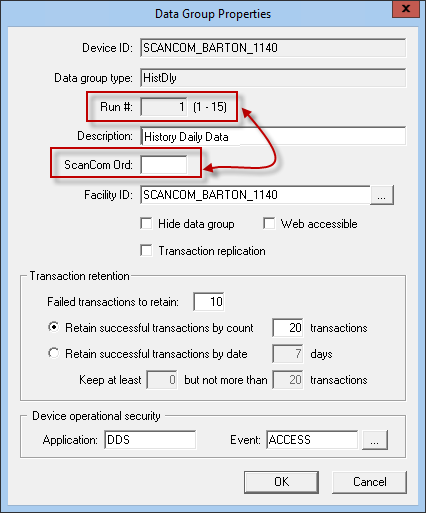
The ScanCom EIE includes several data groups whose Data Group Properties dialog box includes both a data group ordinal field (for example, Run# in the image below) and a ScanCom Ord field. The data group ordinal field can be used to ordinalize a data group in a number of ways; in the image below, it associates a data group with its respective meter run. The ScanCom Ord field applies to any ordinalized data group that includes ScanCom meter ordinal information. This will exclude all FMS data groups.
You must assign the data group a data group ordinal. However, the data group might or might not need to be assigned a ScanCom Ord number. If the data group ordinal for a data group is not the same as the ScanCom meter ordinal that represents the source of the data group's data, specify a ScanCom Ord value. Otherwise, leave ScanCom Ord blank to default to the value assigned to the data group ordinal.
|
|
|

